01
getting started
screenwrite is screenwriting software that doesn't stop at the script. you write in industry-standard format, line the pages inside the same document, and get a shot list out. no retyping, no second app.
built by two vfx artists. twenty dollars, once, including every future version. run the whole thing for 30 days first — whatever you write in that time stays yours either way.
built by two vfx artists. twenty dollars, once, including every future version. run the whole thing for 30 days first — whatever you write in that time stays yours either way.
the path to a shot list
01 download and install. no account, no key needed yet02 launch. your 30 days start here
03 start a new script, or import an existing .fdx or .fountain file
04 write. formatting is handled as you type
05 switch to line view and draw your coverage
06 export the shot list
07 buy from gumroad when you're ready. paste the key in to unlock it permanently
02
install & licensing
the download is the full application. nothing is withheld, watermarked, or cut down for the trial. it runs for 30 days from first launch without a key, and there is nothing to sign up for: screenwrite has no accounts, and no email address or card is asked for before you start.
at 30 days, editing locks. nothing else does. you do not lose anything you wrote. nothing is deleted, hidden, watermarked, or made unreadable. every project opens exactly as you left it, and you can still read it, print it, print sides and lined pages, and export to final draft, fountain, and csv — so your work is portable out of screenwrite whether or not you ever buy it. paste a license key in at any point, during the trial or years later, and editing unlocks in place: no reinstall, no re-import, nothing to recover.
windows. nsis installer, installs for the current user. no administrator rights required. the download is a 64-bit build.
macos. disk image, drag to applications. the build is signed and notarized, so it opens normally on first launch. it is an intel build: on apple silicon, macos offers to install rosetta the first time you open it, and one click is all it needs. a native build is coming.
where the downloads live. every public build is published at github.com/MarkJabo/ScreenWrite-releases, and the store page always links the newest one for your platform. once installed, screenwrite updates itself.
at 30 days, editing locks. nothing else does. you do not lose anything you wrote. nothing is deleted, hidden, watermarked, or made unreadable. every project opens exactly as you left it, and you can still read it, print it, print sides and lined pages, and export to final draft, fountain, and csv — so your work is portable out of screenwrite whether or not you ever buy it. paste a license key in at any point, during the trial or years later, and editing unlocks in place: no reinstall, no re-import, nothing to recover.
windows. nsis installer, installs for the current user. no administrator rights required. the download is a 64-bit build.
macos. disk image, drag to applications. the build is signed and notarized, so it opens normally on first launch. it is an intel build: on apple silicon, macos offers to install rosetta the first time you open it, and one click is all it needs. a native build is coming.
where the downloads live. every public build is published at github.com/MarkJabo/ScreenWrite-releases, and the store page always links the newest one for your platform. once installed, screenwrite updates itself.
your license activates three times. three activations means three machines: a laptop and a desktop, or a move to a new computer, all use the same key. every successful activation counts, though, including reactivating a computer you have used before — reinstalling your os or replacing a drive uses one. run out for a legitimate reason and we will reset your key: email {{ supportEmail }}.
after activation, screenwrite works offline. it checks a file on your own computer, not a server. that file belongs to the machine that made it, so copying an activated install across won't carry the license with it — the new computer activates for itself, using one of your three.
updates are included forever and install from inside the app.
updates are included forever and install from inside the app.
03
the interface
one window, two modes: script view and line view.
typing selects the element and formats it to standard. scene headings, action, character, dialogue, parentheticals, transitions, and centered text are all handled without you setting anything up.
autocomplete offers scene prefixes (INT., EXT., INT./EXT., I/E.), times of day, character names already in your script, common parentheticals, and the standard transitions.
day and night themes are both available. night mode is for stage and bay work.
editor zoom has fixed stops from 80% to 150%.
typing selects the element and formats it to standard. scene headings, action, character, dialogue, parentheticals, transitions, and centered text are all handled without you setting anything up.
autocomplete offers scene prefixes (INT., EXT., INT./EXT., I/E.), times of day, character names already in your script, common parentheticals, and the standard transitions.
day and night themes are both available. night mode is for stage and bay work.
editor zoom has fixed stops from 80% to 150%.
04
line view
draw a line down the passage a shot covers, label it, and it becomes a row in your shot list. coverage, page range, and scene carry across automatically.
shot types. twelve types, each with its own fixed color, so the lined script reads at a glance — wide through close in the warm range, camera-perspective shots in the cool range.
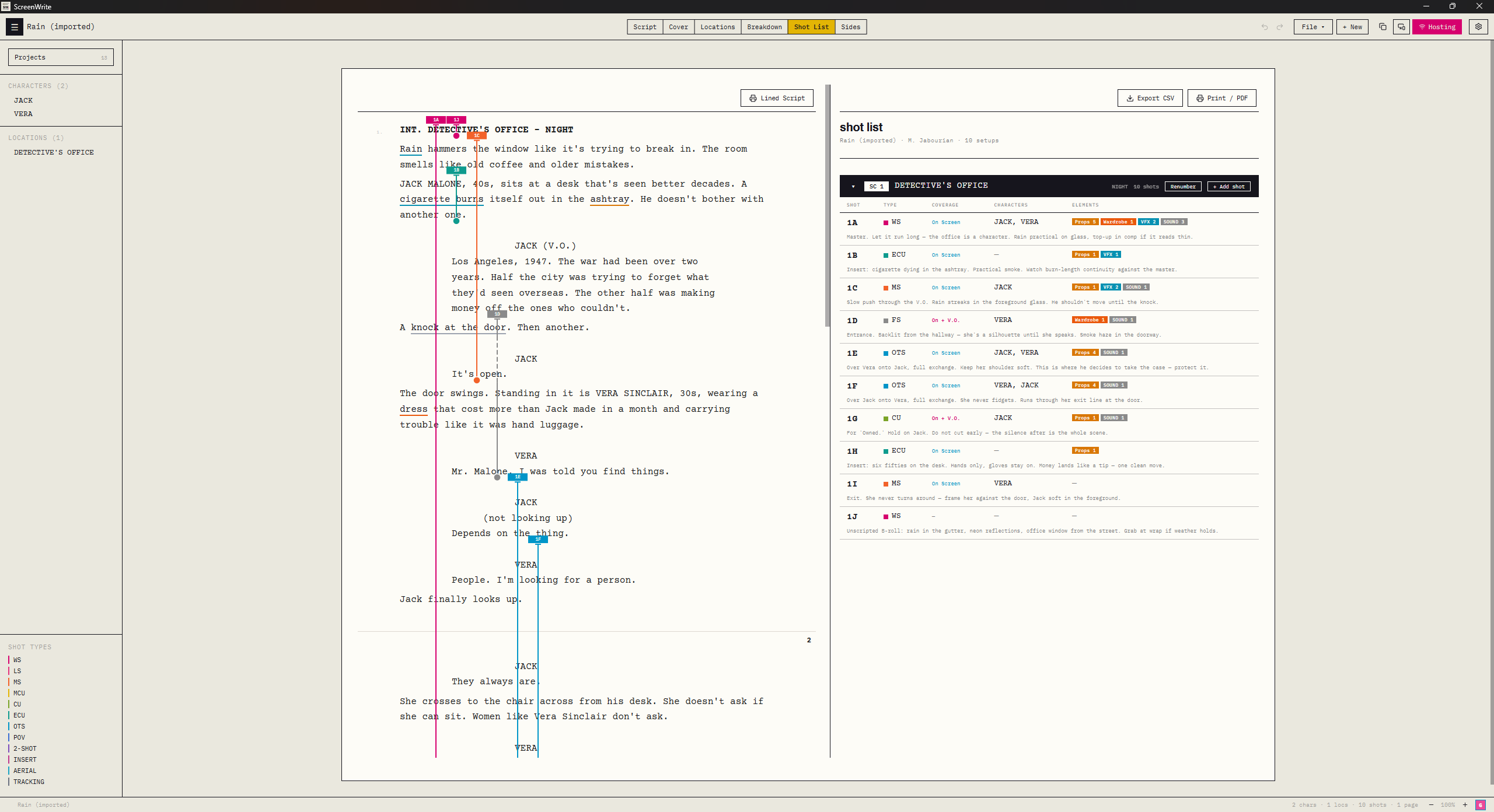 the lined script, and the list it generatesfull size ↗
lining data lives in screenwrite. it is included in the shot list export, the lined script print, and sides. it is not part of the .fdx or .fountain formats, so it does not survive a round trip through those. if you export to final draft and import back, you get the script, not the lining.
05
collaboration
multiple people can work in the same script at the same time, in real time.
only the host needs a license. people you invite can join and work without buying anything.
starting a session. press share. screenwrite generates a link and copies it to your clipboard. send it to whoever you're working with. the cloudflare tunnel opens the first time you press share, not at launch. sharing always goes through cloudflare, so both ends need an internet connection even if you're sitting in the same room.
invite links last 48 hours and are not single-use. anyone holding the link can join inside that window, so treat it like a password with a two-day life. stopping sharing revokes every outstanding invite for that project — used or not — and it's the fastest way to cut someone off.
trusted devices. for a device that will rejoin a project repeatedly, such as a script supervisor's tablet, issue a device token instead of a one-off invite. three per project, valid for ten years, listed per project, revocable individually at any time. one thing to know: a bookmarked device link stops working after you restart screenwrite — the public address is regenerated at every launch, and the encryption key is new each session. the token itself is still good; the device just needs a current link.
only the host needs a license. people you invite can join and work without buying anything.
starting a session. press share. screenwrite generates a link and copies it to your clipboard. send it to whoever you're working with. the cloudflare tunnel opens the first time you press share, not at launch. sharing always goes through cloudflare, so both ends need an internet connection even if you're sitting in the same room.
invite links last 48 hours and are not single-use. anyone holding the link can join inside that window, so treat it like a password with a two-day life. stopping sharing revokes every outstanding invite for that project — used or not — and it's the fastest way to cut someone off.
trusted devices. for a device that will rejoin a project repeatedly, such as a script supervisor's tablet, issue a device token instead of a one-off invite. three per project, valid for ten years, listed per project, revocable individually at any time. one thing to know: a bookmarked device link stops working after you restart screenwrite — the public address is regenerated at every launch, and the encryption key is new each session. the token itself is still good; the device just needs a current link.
the remote link goes through cloudflare, encrypted end to end. the key that decrypts a session is generated on your machine and rides in the part of the link browsers never send to a server, so cloudflare relays your script without being able to read it. two things worth knowing: anyone holding the link holds the key, so treat it accordingly, and comments are protected in transit but not sealed the same way. privacy policy section 03 has the full explanation.
if a collaborator drops, their work up to that point is already in the document. they rejoin with the same link.
06
import & export
format
in
out
{{ f.name }}
{{ f.in }}
{{ f.out }}
on pdf export. screenwrite doesn't render pdfs itself yet. choosing pdf saves a formatted html file and opens it in your browser, where ctrl+p (cmd+p on macos) gives you save as pdf. page numbers appear in print preview. direct pdf export is on the roadmap.
on fountain import. fountain is a plain-text convention rather than a strict format, so import is best-effort. it handles the structural rules and inline markup, and strips boneyards and note blocks. unusual files may need a look afterward.
on fountain import. fountain is a plain-text convention rather than a strict format, so import is best-effort. it handles the structural rules and inline markup, and strips boneyards and note blocks. unusual files may need a look afterward.
07
keyboard shortcuts
screenwrite has two shortcut profiles, switchable in settings.
screenwrite profile — letter chords
{{ k.el }}
{{ k.key }}
industry standard profile uses number keys, matching final draft and fade in: 1 scene heading, 2 action, 3 character, 4 parenthetical, 5 dialogue, 6 transition, 7 centered. (screenwrite has no shot element, which is final draft's 7.)
whichever profile is active, the other scheme's keys are left completely alone.
also: cmd/ctrl + f to find. tab cycles element type. enter on an empty block opens the element menu.
whichever profile is active, the other scheme's keys are left completely alone.
also: cmd/ctrl + f to find. tab cycles element type. enter on an empty block opens the element menu.
08
troubleshooting
my trial ran out and i can't type.
that's the trial ending rather than anything breaking, and nothing has been lost. every script is still there and still opens; printing and export still work. paste a license key into settings and editing comes straight back, in place.
my key won't activate.
check for stray spaces at either end. if you get an activation-limit message, you have used all three; email {{ supportEmail }} and we will reset it.
i got a new computer.
activate on the new machine as normal. if you're out of activations, email us.
an .fdx file imported badly.
send us the file. final draft files vary more than the format suggests and we would rather fix the importer than have you retype anything.
a collaborator can't join.
both of you need to be online, even on the same network. invite links expire after 48 hours, so an older link won't work — press copy again for a fresh one. a bookmarked trusted-device link also stops working after you restart screenwrite; send a current link. if a link fails outright, close and reopen screenwrite, then press share again.
lines don't line up after editing.
send us the project. this is the part of screenwrite we most want to hear about.
that's the trial ending rather than anything breaking, and nothing has been lost. every script is still there and still opens; printing and export still work. paste a license key into settings and editing comes straight back, in place.
my key won't activate.
check for stray spaces at either end. if you get an activation-limit message, you have used all three; email {{ supportEmail }} and we will reset it.
i got a new computer.
activate on the new machine as normal. if you're out of activations, email us.
an .fdx file imported badly.
send us the file. final draft files vary more than the format suggests and we would rather fix the importer than have you retype anything.
a collaborator can't join.
both of you need to be online, even on the same network. invite links expire after 48 hours, so an older link won't work — press copy again for a fresh one. a bookmarked trusted-device link also stops working after you restart screenwrite; send a current link. if a link fails outright, close and reopen screenwrite, then press share again.
lines don't line up after editing.
send us the project. this is the part of screenwrite we most want to hear about.
can't find it? {{ supportEmail }} — and tell us what you were looking for, so it ends up on this page.